


Quick answer
If your WordPress site sends some visitors to spam, scam, adult, pharma or fake-prize pages, it is almost never a setting. It is malware: injected code that decides who gets redirected and who sees the real site.
The fix is a full cleanup of files and the database, then resetting access and asking Google to review the site.
I have cleaned enough redirect infections to recognise the pattern within minutes. The owner opens the site on a laptop and everything looks fine.
Customers, or Google, tell a different story. By the time someone emails us, traffic has dipped and someone has already seen a red browser warning.
This guide covers the symptoms: how to recognise the redirect, why it hides from you, where the code lives and what a proper cleanup looks like.
Signs your site is redirecting to spam
Redirect malware rarely shows up in the dashboard. Look for these patterns instead:
- Redirects only on mobile. Desktop looks normal, but phones jump to a spam page.
- Only when arriving from Google. Typing the URL works; clicking your search result does not.
- Only on the first visit. A refresh shows the real site, so you keep missing it.
- Never when you are logged in. Logged-out visitors get the spam hop.
- Browser or Google warnings. “Deceptive site ahead” or “This site may be hacked”.
- Odd admin users or files. Accounts you did not create, or PHP files inside
uploads.
Why only some visitors see it
The redirect is not broken when you cannot reproduce it. It is cloaking. Before it fires, the injected code checks the visitor.
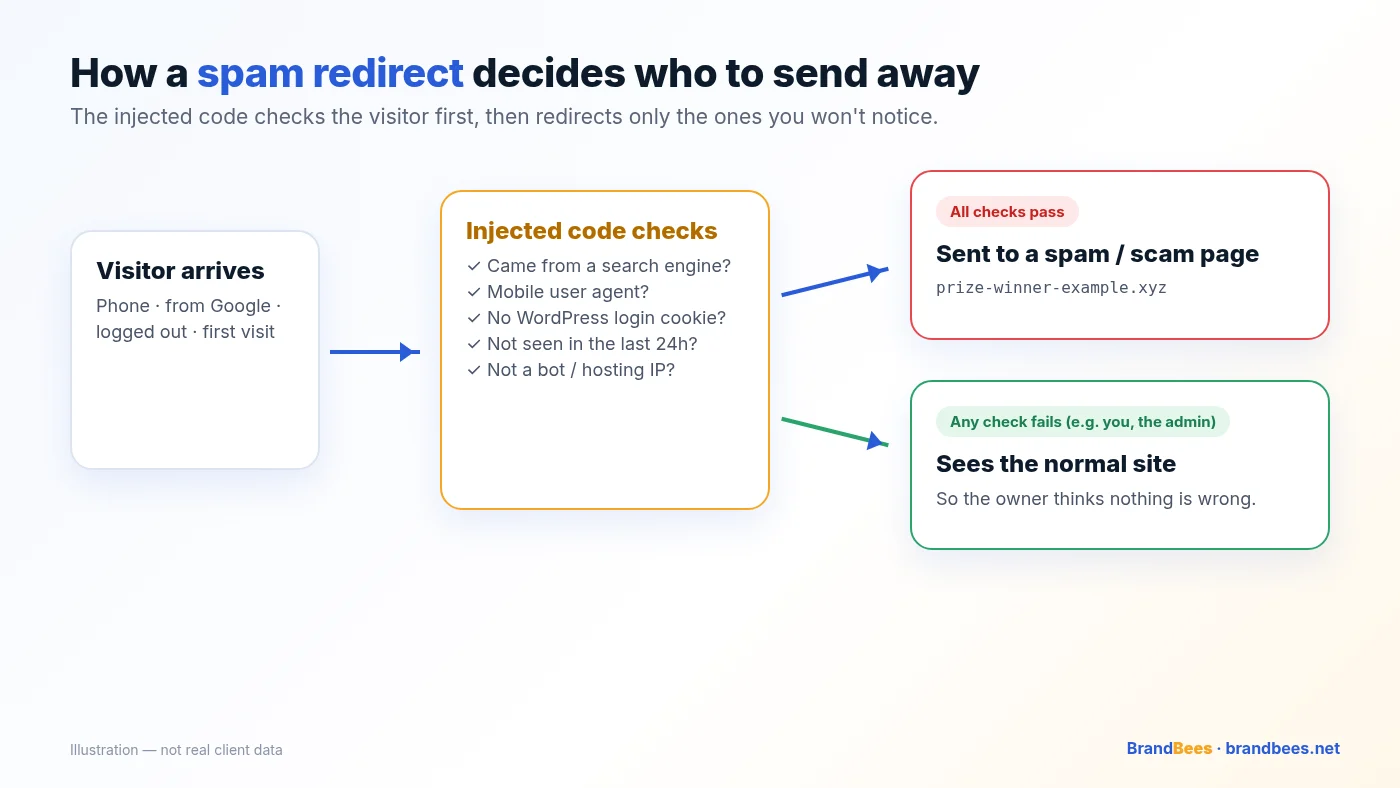
- Referrer: did they come from Google, Bing or another search engine?
- User agent: phone, tablet or desktop?
- Cookies: was this browser already redirected today?
- Login status: is there a WordPress login cookie?
- IP and location: some payloads skip hosting, VPN and bot ranges.
Tip
Test like a stranger: a phone on mobile data, a private window, logged out, arriving from a Google result.
Where the redirect code hides
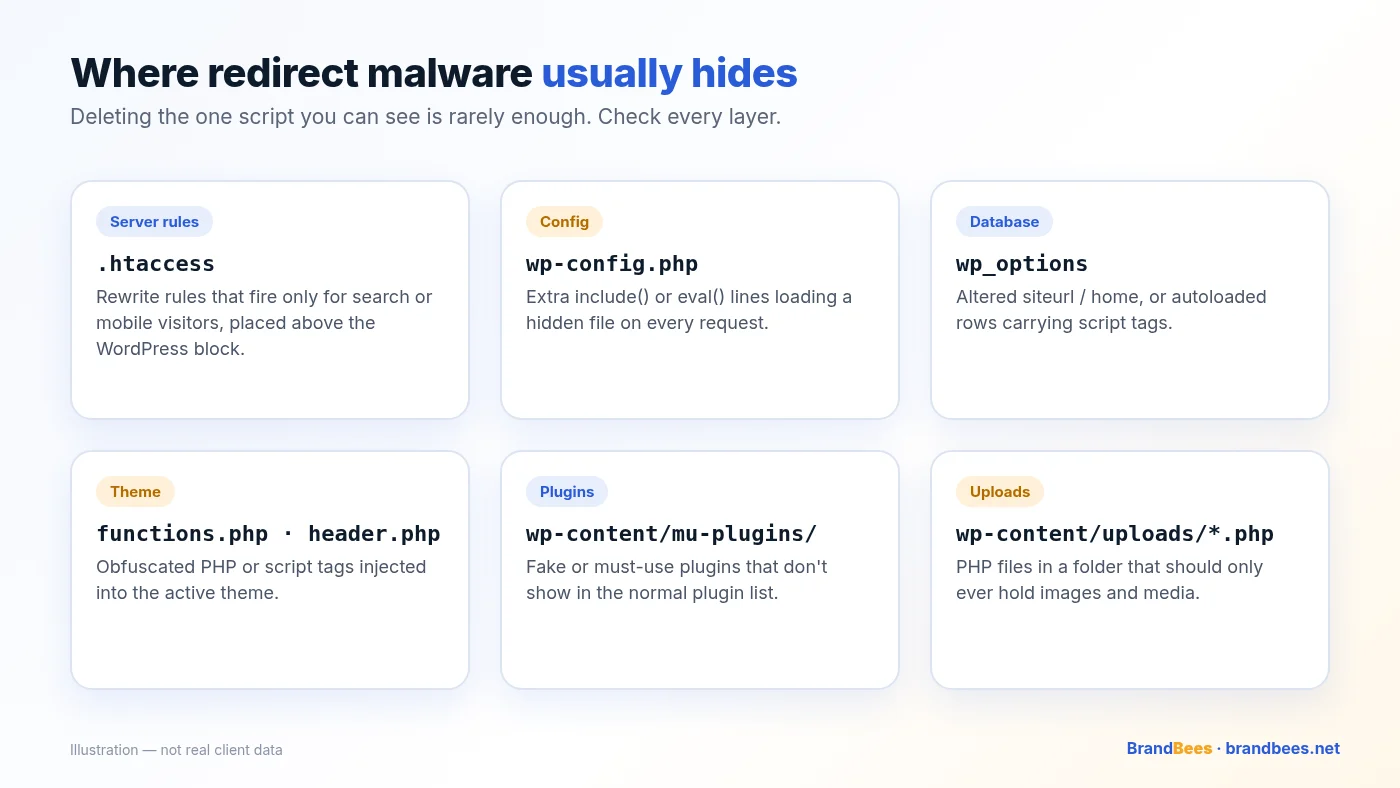
Something on the site is rewriting the visitor’s destination. These are the places we check first.
Server and config files
Look for conditional rewrite rules above the normal WordPress block in .htaccess, for example:
# Suspicious: redirects only visitors arriving from search engines
RewriteCond %{HTTP_REFERER} (google|bing|yahoo) [NC]
RewriteRule ^(.*)$ https://spam-example.xyz/ [R=302,L]
In wp-config.php, watch for unexpected include, eval() or base64_decode() lines.
Database
Check that siteurl and home in wp_options are still your domain, and look for script tags in posts, widgets and options:
SELECT option_name FROM wp_options
WHERE option_value LIKE '%<script%';
Themes, plugins and uploads
- Obfuscated code in
functions.phporheader.phpof the active theme. - Fake plugins, or files in
wp-content/mu-plugins/that never appear in the plugin list. - Any
.phpfile insidewp-content/uploads/, which should only hold media. - Outdated or nulled plugins and themes, a common entry point.
Quick checks you can do safely
Do these before you delete anything. The goal is confirmation, not surgery on a live infected site.

- Open the site in a private window on a phone using mobile data.
- Search your brand on Google and click the result instead of typing the URL.
- In Google Search Console, open Security issues and Manual actions.
- Check the domain in Google’s Safe Browsing site status.
- Review Users → All Users for admins you did not create.
- Take a full backup (files and database) before changing anything.
Warning
Do not log in to wp-admin from a computer you suspect is infected, and do not restore an old backup until you know it predates the infection.
What Google shows when it notices
Once Google detects the hack, two warnings usually appear. Both cost you clicks until the site is cleaned and reviewed.

- Search Console lists the issue under Security issues, with sample URLs.
- Browsers show a full-page red “Deceptive site ahead” warning.
- Search results may show “This site may be hacked” under your listing.
How a proper cleanup works
A redirect hack is not fixed by deleting the one script you can see. A proper job follows a sequence.

Back up and isolate
Copy files and database first. Limit damage while you work.
Scan files and database
Core, themes, plugins, uploads, mu-plugins,
.htaccess,wp_options, posts and widgets.Remove malware and backdoors
Strip injected code and every way back in, not just the visible redirect.
Replace core, themes and plugins
Reinstall clean copies from trusted sources.
Reset access
New passwords, fresh salts in
wp-config.php, rogue admins removed.Harden and update
Close the entry point, update everything, remove unused plugins.
Request a Google review
File the review in Search Console once the site is clean.
Monitor for reinfection
Watch files, users and search results for the following weeks.

Risks of fixing it yourself
If you know your stack, you can do a lot of this. The danger is a partial cleanup that looks fine for a day and then comes back.
- Backdoor left behind. The visible script goes, the attacker’s access stays.
- Breaking the site. Blind edits to
functions.phpor.htaccesscan take it offline. - Longer Google warnings. Remnants make review requests fail.
- Infected backups. Rolling back can restore the same malware.
Related reading
- How to detect and clean a WordPress malware redirect
- Japanese keyword hack: what it is and how to fix it
- How much does WordPress malware removal cost?
- How to recover SEO rankings after a hacked website
Frequently asked questions
Why does my WordPress site redirect to spam only on mobile?
The malware often checks the browser user agent and only redirects phones and tablets. Owners testing on a desktop never see it, which is why the infection can run for weeks before anyone reports it.
Why can’t I see the redirect when I’m logged in?
Many payloads skip logged-in WordPress users on purpose. They look for a missing login cookie, then redirect everyone else. Always test in a private window while logged out.
Will changing my password fix it?
Changing passwords is necessary after a hack, but it does not remove injected code, backdoors or rogue admin users. Reset credentials after the cleanup, not instead of it.
Can a redirect hack hurt my Google rankings?
Yes. Safe Browsing warnings, “This site may be hacked” labels, spam titles in search results and lost trust all suppress clicks and rankings until the site is cleaned and reviewed.
How long does cleanup take?
Every BrandBees malware plan is cleaned within 24 hours of us receiving working access. Emergency is the rush option: work starts within 4 hours of access.
Is my hosting company responsible?
Hosts look after the server. Malware inside WordPress files, the database, themes and plugins is usually the site owner’s responsibility unless your hosting plan explicitly includes cleanup.
Can I just restore a backup?
Only if you are sure the backup predates the infection and you also close the entry point. Restoring an infected backup, or a clean one without fixing the hole, usually brings the redirect back.
Will Google remove the warning automatically?
Not always. After cleanup, request a review in Search Console under Security issues. Reviews for hacked-site warnings typically take a few days once the site is genuinely clean.
Site redirecting to spam right now?
Fixed-price cleanup from $149, cleaned within 24 hours of access. 60-day reinfection warranty on $249 and $349 plans.
Free PDF
WordPress Security Checklist
The same checks we run on client sites, written in plain English. Work through it in an afternoon.
- Logins, updates, backups and hosting, step by step
- A 10-minute self-test you can run today
- What to do if you think you’ve been hacked
